When you win a fabrication bid, the estimate becomes a project in Linarc. The project is your workspace for the job: it is where you manage the fabrication work you have committed to deliver to the general contractor (GC), from shop drawings and production through to delivery on site.
The 'Project Information' screen shows the general details of the project at a glance, such as the project name and job ID, your role on the project, the construction site address and site contact, and the project dates. Keep these details accurate, because they identify the job across your team and tell your shop and drivers where fabricated material is to be delivered.
- The project is created when you convert a winning estimate into a project. The details captured in the estimate, such as the project name and site address, are carried over to the project. See Convert an Estimate to a Project.
- Any details not carried over from the estimate are entered when the project is created.
To open the project information screen
- Click 'Projects' at the top of your landing page.
- Click 'My Projects' on the left. The list of your projects opens, with their details.
- Click the name of the project to open its project workspace.
The 'Project Information' screen opens by default.
If you are already on another screen in the project workspace, click 'Project' at the top, then click 'Project Info' on the left.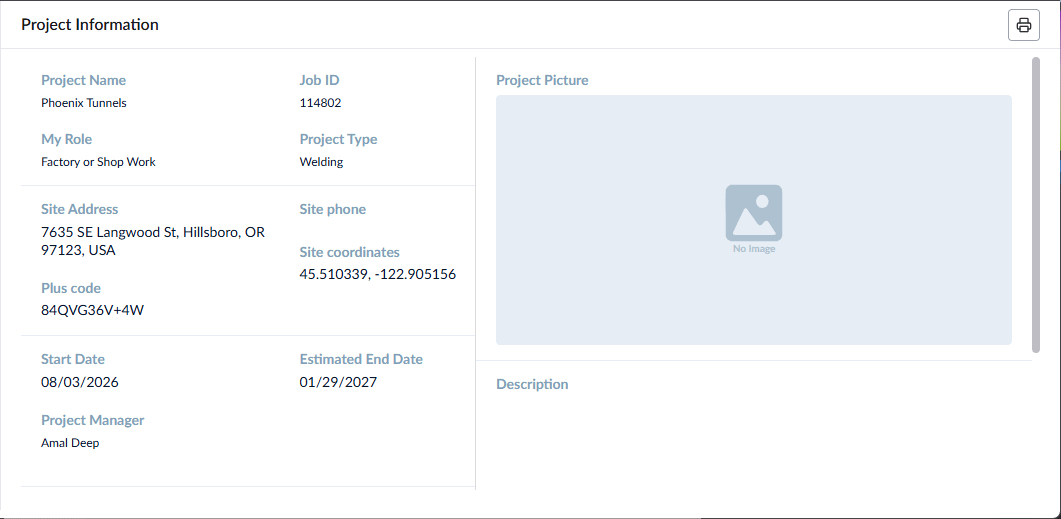
The screen shows the following details.
- Project Name - The name used to identify the project in Linarc. This is inherited from the Job Name entered while creating the estimate.
- Job ID - A unique alphanumeric code for the project, inherited from the estimate.
- My Role - Your company's role on the project, such as subcontractor. This is filled in automatically based on your company type as registered with Linarc.
- Project Type - The category of the construction project, for example, commercial, residential or industrial.
- Site Address - The address of the construction site where the fabricated structures will be delivered and installed.
- Site Phone - The phone number of the main contact at the construction site, typically the GC's site superintendent or project manager. Your drivers and erection crew can use this number to coordinate deliveries and site access.
- Plus Code - Filled in automatically from the site location. Plus codes help delivery and freight services find sites that have no street address, which is common on new construction.
- Site Coordinates - The latitude and longitude of the site, in decimal degrees. If the site address cannot be found, enter the coordinates instead; the address is then filled in automatically.
- Start Date - The date your work on the project starts.
- Estimated End Date - The date your work on the project is planned to finish, typically the final delivery or erection date agreed with the GC.
Was this article helpful?
That’s Great!
Thank you for your feedback
Sorry! We couldn't be helpful
Thank you for your feedback
Feedback sent
We appreciate your effort and will try to fix the article